What is BuiltWith?
BuiltWith is a technology lookup service. It crawls websites, records the technologies it can detect and keeps the history, so you can look up one site or ask for every site that uses a given tool. The free lookup on builtwith.com covers individual sites; lead lists, alerts and the full API are paid. Its BuiltWith Chrome extension shows the technologies of the site you are on.
BuiltWith pricing and the main BuiltWith alternatives
Prices from the providers' pricing pages on November 20, 2026:
| Tool | Plan | Price | What you get |
|---|---|---|---|
| BuiltWith | Basic | $295 a month | 2 technologies and 2 keywords to build lists for, 1 login |
| BuiltWith | Pro | $495 a month | Unlimited technologies, keywords and reports, 1 login |
| BuiltWith | Team | $995 a month | Pro for unlimited users |
| BuiltWith | Free | $0 | Individual site lookups; a free API with technology group counts, 1 request per second |
| Wappalyzer | Pro / Business / Enterprise | $250, $450, from $850 a month | Lead lists, technology lookups and email verifications; API credits expire after 60 days |
| Wappalyzer | Free | $0 | 50 technology lookups a month and sample lead lists |
| Extracto | Pay as you go | $1.5 / 1,000 results | One scan per website, no subscription |
Wappalyzer vs BuiltWith
Wappalyzer is the best known of the BuiltWith competitors. Both detect technologies from page code, headers and scripts, and both sell lead lists built from their crawls. BuiltWith's plans are priced by how many technologies you build lists for; Wappalyzer's by users, lookups and API credits. In practice the choice comes down to which technologies you prospect on and whether the coverage for them is good. Test both with the free tiers on 20 sites you know before paying for a year.
For side-by-side tables of prices and returned data, see Extracto vs BuiltWith and Extracto vs Wappalyzer.
Websites like BuiltWith that charge per scan
Most BuiltWith alternatives copy its subscription model. If you already have the list of websites (from a CRM export, a Google Maps lead list or a search results export), you do not need a historical index; you need to scan those sites. The Website Technology Detector visits each URL and returns:
| Field | What it contains |
|---|---|
| cms, ecommerce, frameworks | Detected CMS, ecommerce platform and front-end frameworks |
| libraries, analytics, advertising, marketing, payments | Detected tools in each category |
| cdn, hosting | CDN and hosting provider |
| tech_stack | Everything detected, as one readable list |
| intelligence.detections | For each technology: category, vendor, version when visible, a confidence score and the evidence |
| status, httpStatus, resolvedUrl | Whether the scan worked and where the URL redirected |
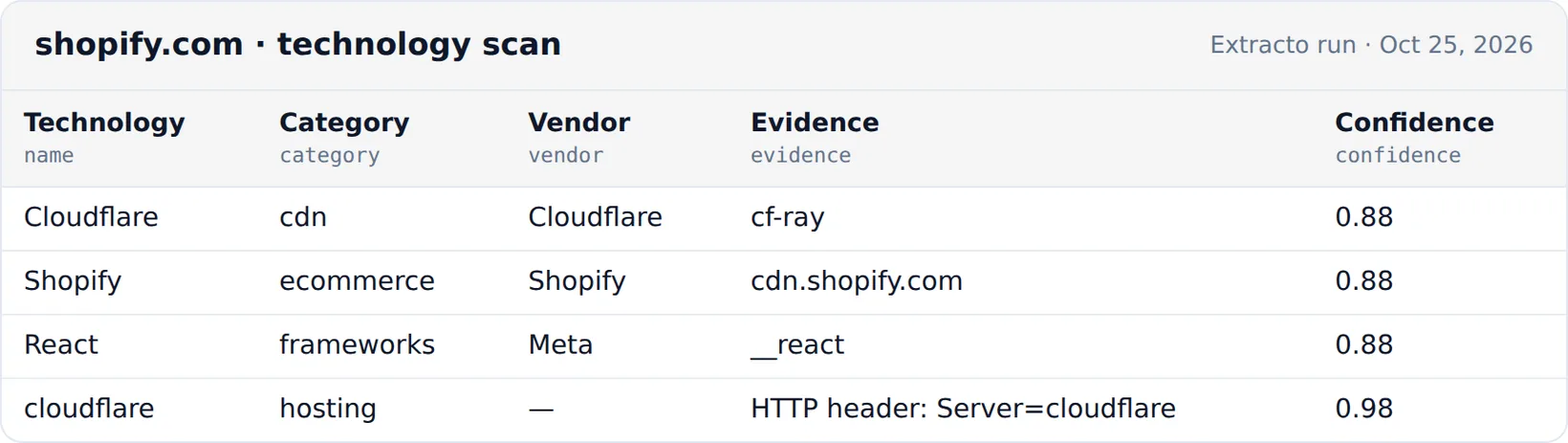
The evidence field is what makes it auditable: for shopify.com the detector reported Shopify because of cdn.shopify.com, Cloudflare because of the cf-ray header and React because of a __react marker. 1,000 websites cost $1.50.
Website technology lookup API
Like the BuiltWith API, the detector runs through an API. This request scans two websites:
curl --request POST 'https://extracto.cloud/api/v1/parsers/website-technology-detector?wait=1' \
  --header 'X-API-KEY: ext_your_api_key' \
  --header 'Idempotency-Key: tech-scan-2026-11-20' \
  --header 'Content-Type: application/json' \
  --data '{"input": {"urls": ["https://www.shopify.com", "https://www.allbirds.com"]}}'
What no technology detector can see
- Server-side tools that leave no trace in the HTML or headers, such as a back-office ERP.
- Tools loaded only after a login, a cookie consent or a user action.
- Exact versions, unless the site exposes them.
- History: a scan shows the site today. BuiltWith's index answers "when did they switch?"; a scan does not.
What people use technology data for
- Prospecting: filter a lead list to stores on a platform your product integrates with.
- Personalised outreach: mention the prospect's CMS or analytics tool in the first line.
- Competitor research: what your competitors use for payments, chat or A/B testing.
- Security and IT audits: an inventory of CDNs and platforms across your own domains.
For Shopify specifically, see how to find Shopify stores.