Where business emails are published
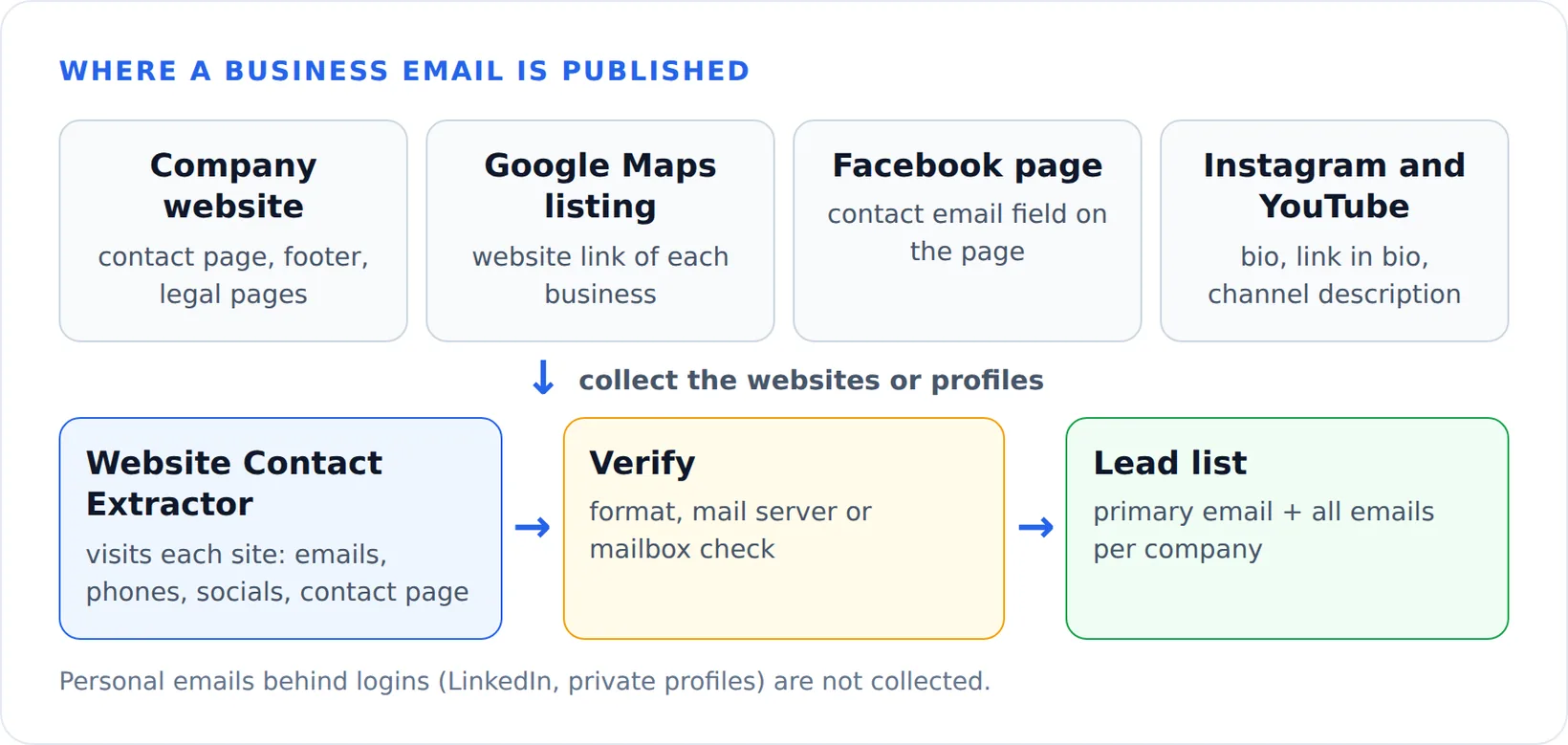
Companies publish an email so customers can reach them: on the contact page, in the footer, on legal pages and in social profiles. An email address scraper is only as good as its sources, so a good one looks in those places rather than guessing addresses. The sources, from most to least productive:
- The company website. Contact, about and legal pages usually list a general address such as info@ or hello@, and often department addresses.
- Google Maps listings. They rarely show an email, but they give you the website of every business in a category and city. See building a lead list from Google Maps.
- Facebook pages. Many pages fill in a contact email field.
- Instagram and YouTube. Creators and small brands put an email in the bio, the link in bio or the channel description. See the Instagram email scraper guide.
Scraping emails from websites
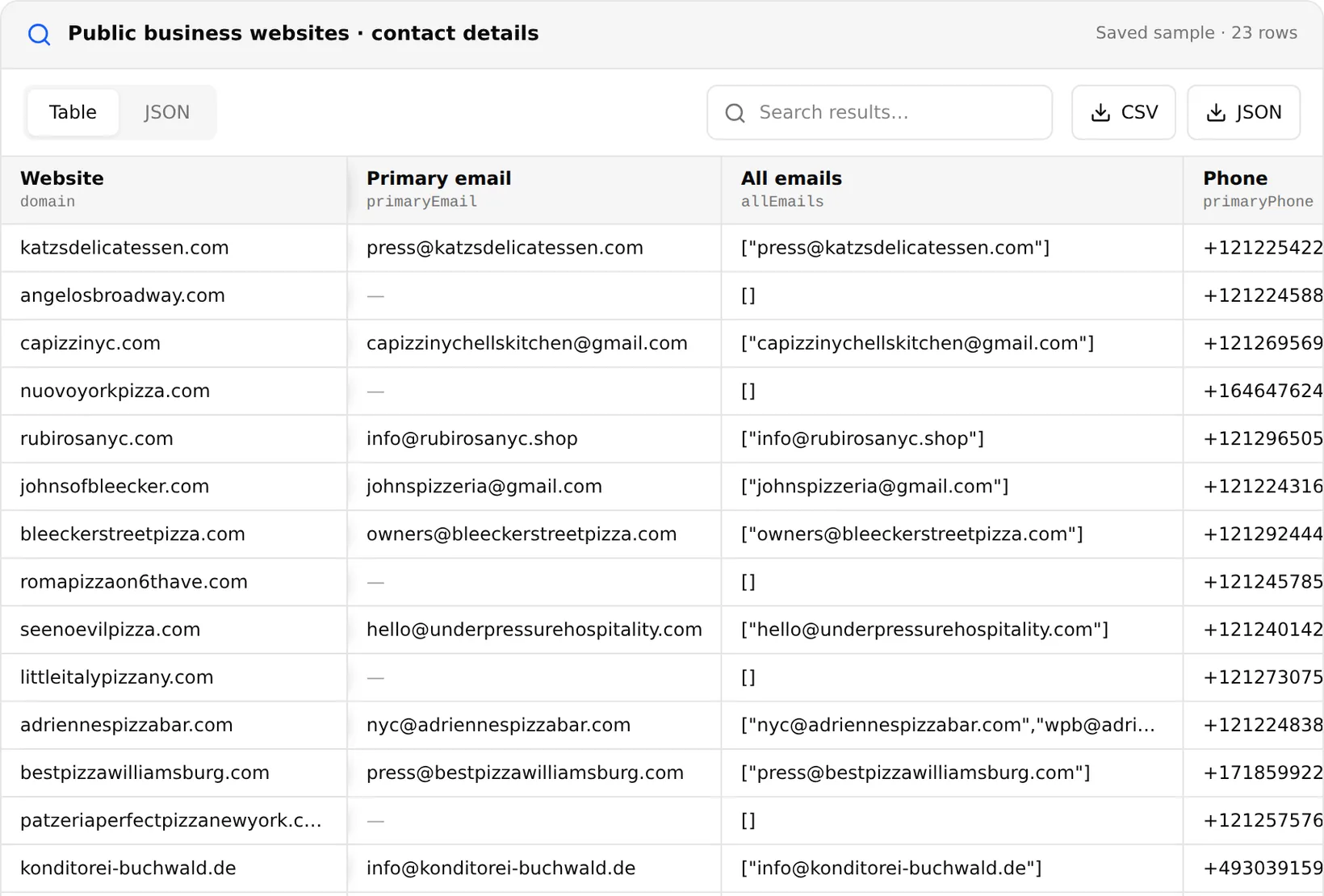
The Website Contact Extractor is a scraper for email addresses on websites. Running an email scraper from a website list is simple: paste up to 10,000 domains or URLs, and it visits each site's homepage and the pages most likely to hold contacts, up to 200 pages per site. For each website you get one row:
| Field | What it contains |
|---|---|
| primaryEmail, allEmails | The most likely contact address and every address found |
| primaryPhone, allPhones | Phone numbers published on the site |
| socials, linkedin | Links to the company's social profiles |
| contactPageUrl, contactForm | Where the contact page is and whether it has a form |
| organizationNames, addresses, vatIds | Company names, postal addresses and VAT numbers when the site shows them |
| status, pagesCrawled | Whether the scan succeeded and how many pages were checked |
The number of pages per site does not change the price. When the plain scan finds no email, a browser fallback can retry the homepage and contact page for sites that load their contacts with JavaScript; it is charged separately per website that uses it. The scanner follows robots.txt by default. 1,000 websites cost $0.80.
Verifying scraped emails
A scraped address can be out of date or never have worked. Sending to bad addresses raises your bounce rate and hurts your sender reputation, so check addresses before a campaign. The extractor can verify each email it finds at three levels: format only, a mail-server (MX) lookup, or an SMTP mailbox probe. Each email actually checked is charged once; the deeper levels take longer.
Facebook, LinkedIn and YouTube email scrapers
A Facebook email scraper reads the contact email that a business page has filled in. The Facebook Pages Scraper returns it in the contact_email field together with the page's websites, category and follower count; NASA's page, for example, lists a public inquiries address. More in the Facebook scraper guide.
A YouTube email scraper is limited to what channels publish: YouTube hides the business email behind a CAPTCHA, so collect the links and addresses written in video descriptions instead, as described in the YouTube scraper guide.
LinkedIn email scrapers usually work by logging into an account or by guessing addresses from names and company domains. Extracto does neither. For company contacts, collect the company website from the LinkedIn company scraper and run it through the Website Contact Extractor.
Free email scrapers, extensions and GitHub scripts
A free email scraper Chrome extension, or any web email scraper extension for another browser, reads the page you have open and lists the addresses on it. That is fine for a handful of sites, but it does not visit contact pages for you or work through a list of 5,000 domains. Email scraper GitHub projects and short scripts do the same job in code. The core is a regular expression:
import re
from urllib.parse import urljoin

import requests

EMAIL = re.compile(r"[A-Za-z0-9._%+-]+@[A-Za-z0-9.-]+\.[A-Za-z]{2,}")
HEADERS = {"User-Agent": "Mozilla/5.0 (compatible; my-scraper/1.0)"}

def emails_on(url):
    html = requests.get(url, headers=HEADERS, timeout=20).text
    found = set(EMAIL.findall(html))
    # drop image file names that look like emails, e.g. [email protected]
    return {e for e in found if not e.lower().endswith((".png", ".jpg", ".jpeg", ".gif", ".webp", ".svg"))}

site = "https://katzsdelicatessen.com/"
emails = emails_on(site)
for path in ("contact", "contact-us", "about"):
    try:
        emails |= emails_on(urljoin(site, path))
    except requests.RequestException:
        pass
print(sorted(emails))
Run on November 20, 2026, it printed ['[email protected]'], the same address the Website Contact Extractor found. At scale you also need to find the right contact pages on each site, decode obfuscated addresses, render JavaScript, handle timeouts and run sites in parallel. That is what the hosted tool adds.
How to choose between email scraper tools
- Source: does it scan websites, or only the page in your browser?
- Input: can it take a list of domains, or the output of a Google Maps or social media scraper?
- Pricing unit: per website, per email found or a monthly seat. Per-website pricing is easiest to predict.
- Verification: built in, or a separate tool?
- Extras: phones, social links and contact forms help when a site has no email.
To keep only companies on a platform you sell to, check each website’s technology first: see the BuiltWith alternative guide.
Is email scraping legal?
Collecting business addresses that companies publish for contact is common, but what you do next is regulated. Anti-spam laws such as CAN-SPAM in the United States require an honest sender and a working unsubscribe link, and in the EU and UK the GDPR and e-privacy rules restrict unsolicited email, especially to individuals. Prefer generic business addresses, keep a record of where each address came from, and honour opt-outs.