What a LinkedIn scraper can collect
| Scraper | Input | Main fields | Price |
|---|---|---|---|
| LinkedIn Company | Company page URLs or company names | Name, website, employee count and range, followers, industries, specialities, locations, description, phone, similar companies | $4 / 1,000 results |
| LinkedIn Jobs | Keywords and location, or LinkedIn job-search URLs | Title, company, location, salary when shown, posting date, applicant count, seniority, employment type, description | $1.13 / 1,000 results |
LinkedIn company scraper
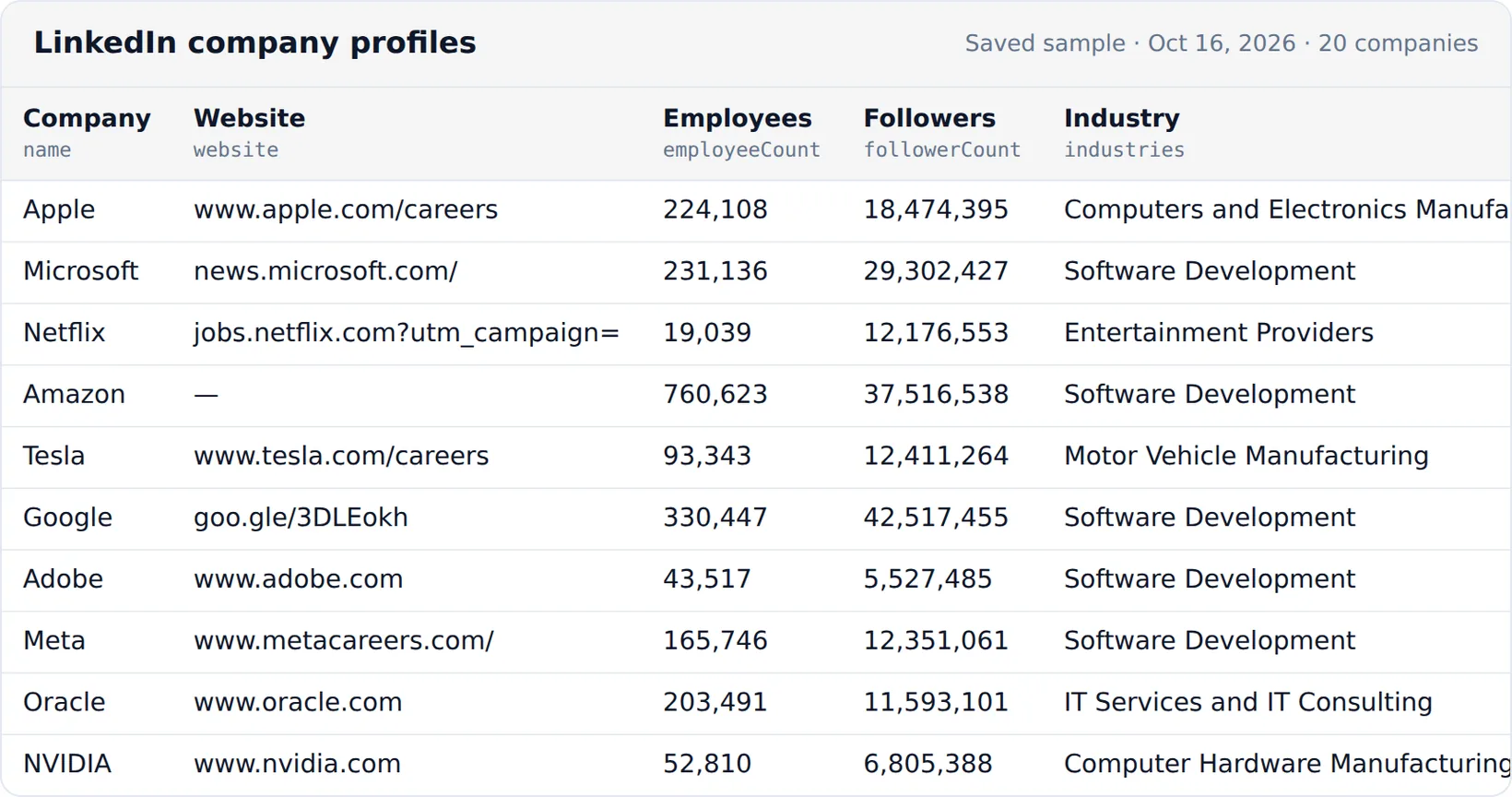
The LinkedIn Company Scraper takes company page URLs such as linkedin.com/company/microsoft, or company names it searches for, and returns one profile per company. Besides the basics you get the employee count range, follower count, company type, locations, specialities, logo and the company's similar and affiliated pages.
The website field is what makes it a LinkedIn lead scraper: send the websites to the Website Contact Extractor for published emails and phones, or to the technology detector to qualify accounts by the tools they use. 1,000 company profiles cost $4.00.
For funding rounds and investors, add Crunchbase profiles: see the Crunchbase API guide.
LinkedIn job scraper
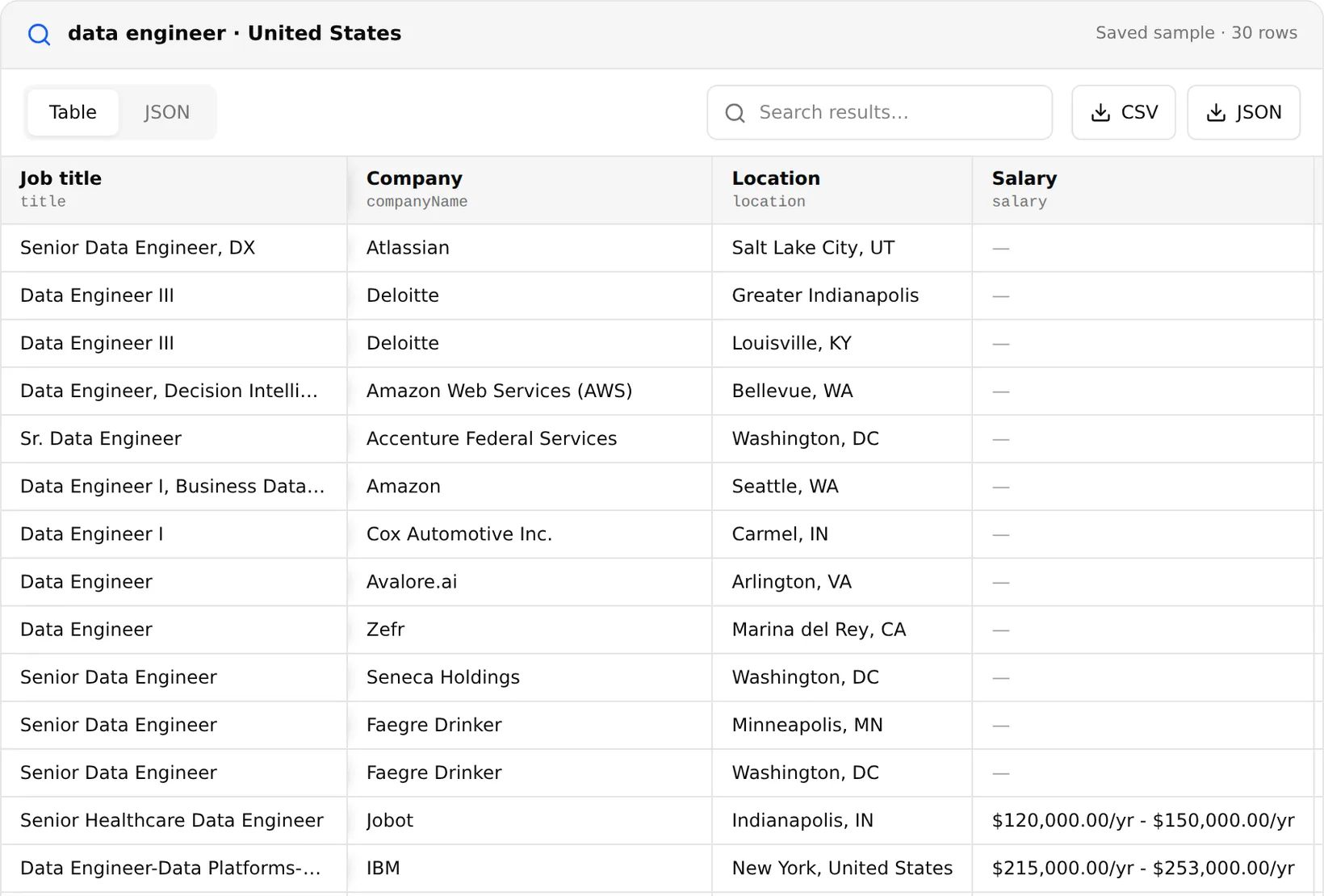
The LinkedIn Jobs Scraper searches the public job listings by keyword and location, or takes job-search URLs copied from your browser with their filters. Limit results to jobs posted in a recent window, to specific companies, or sort by most recent. An option adds each employer's company profile (description, website, size, industry) to the job rows. 10,000 jobs cost $11.30. For a comparison with Indeed, Glassdoor and Google Jobs, see the job scraper guide.
Profiles, posts, emails and Sales Navigator
Searches for a LinkedIn profile scraper, a LinkedIn post scraper or a LinkedIn Sales Navigator scraper are common, and many tools offer them. They usually work by logging in to a LinkedIn account, often your own, and reading pages as that user. Extracto does not do this:
- People's profiles are personal data, and most of their detail is visible only to logged-in members.
- Sales Navigator is a paid, logged-in product; automating it risks the account it runs on.
- Emails: LinkedIn does not show members' emails publicly. A LinkedIn email scraper either reads the emails of your own connections or guesses addresses from names and domains.
For B2B outreach, start from companies instead: collect company profiles, then find the contact details the company publishes on its own website, as described in the email scraper guide.
If you need profile scraping and outreach through your own account, compare the trade-offs in Extracto vs PhantomBuster.
What LinkedIn's API allows
LinkedIn's developer documentation says open permissions are the only ones available to all developers without special approval: Sign In with LinkedIn and Share on LinkedIn. Marketing integrations must be approved, sales integrations require approval as a Sales Navigator Application Platform partner, and talent integrations go through LinkedIn's talent programs. There is no open API for searching people or companies.
LinkedIn scraper API and Python
Both scrapers run through the Extracto API, so a LinkedIn scraper in Python is a single request:
import requests

response = requests.post(
    "https://extracto.cloud/api/v1/parsers/linkedin-company?wait=1",
    headers={"X-API-KEY": "ext_your_api_key", "Idempotency-Key": "companies-2026-11-20"},
    json={"input": {"companies": ["https://www.linkedin.com/company/microsoft",
                                 "https://www.linkedin.com/company/adobe"]}},
    timeout=600,
)
for c in response.json()["data"]:
    print(c["name"], c.get("website"), c.get("employeeCount"))
LinkedIn scraper GitHub projects in Python and JavaScript mostly drive a logged-in browser session. They work until LinkedIn flags the account, which is why hosted tools that stick to public pages last longer.
How to choose a LinkedIn scraper tool
- Login: does the tool use your account? A web scraper for LinkedIn that needs your session puts that account at risk.
- Data: companies and jobs are public; profiles and posts usually are not.
- Pricing: per result, per seat or a monthly plan. A free LinkedIn scraper extension usually caps exports or needs your session.
- Output: does it give the company website, so you can enrich from public sources?
Whether a vendor calls it a LinkedIn web scraper or a LinkedIn data scraper, the questions are the same. If you are comparing hosted LinkedIn scrapers, compare the price per 1,000 companies or jobs and whether the tool needs your LinkedIn cookies. The best LinkedIn scraper for most B2B teams is the one that gets the data you need without putting an account at risk.
Is it legal to scrape LinkedIn?
Company pages and job listings are public business information, but LinkedIn's user agreement prohibits scraping, and member profiles contain personal data protected by privacy laws such as the GDPR. Stick to public company and job data, do not log in with automation, and handle any personal data you hold lawfully.